
Latest Version
Version
3.6.1
3.6.1
Update
August 11, 2026
August 11, 2026
Developer
Yurao Network
Yurao Network
Categories
Tools
Tools
Platforms
Android
Android
Downloads
0
0
License
Free
Free
Package Name
com.screen.translate.google
com.screen.translate.google
Report
Report a Problem
Report a Problem
More About Screen Translate AI OCR
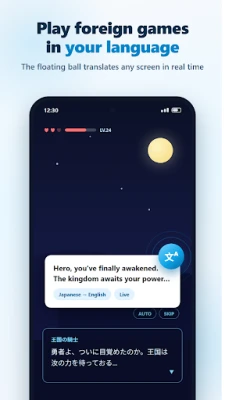
Screen Translate is an AI translation tool for real-time screen translation, game localization, manga reading, photo translation, AR translation and voice translation. 20+ engines, advanced OCR, 100+ languages. No app switching needed.
Playing overseas games, reading raw manga, browsing foreign sites or chatting across languages? Screen Translate removes barriers instantly.
🎯 5 Translation Modes
📱 Standard Mode - 8 tools
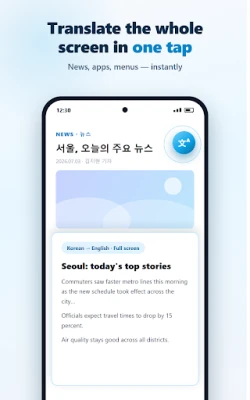
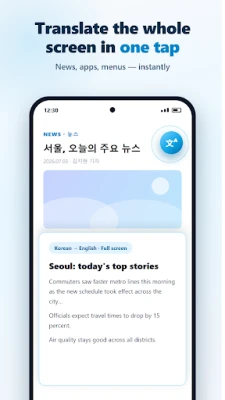
▸ Full-screen capture: Translate everything on screen
▸ Region selection: Select and translate any area
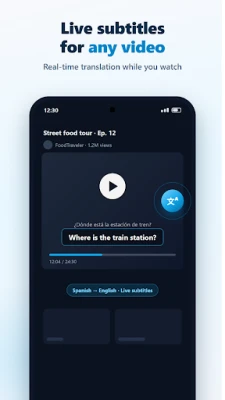
▸ Subtitle detection: Auto-translate video subtitles
▸ Popup input: Type text for instant results
▸ Auto-screenshot: Detects screen changes for gaming and videos
▸ Speech-to-text: Real-time voice recognition
▸ Tap-to-translate: Tap anywhere to translate visible text
▸ Context-aware chat: Multi-turn conversational AI
📖 Reading Mode - Long articles and web pages with magnifier for precise word selection
🔲 Region Mode - Advanced region handling for complex layouts
🎬 Story Mode (VIP) - AI understands context and maintains narrative flow
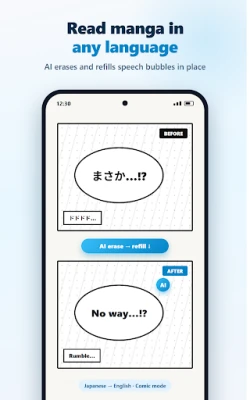
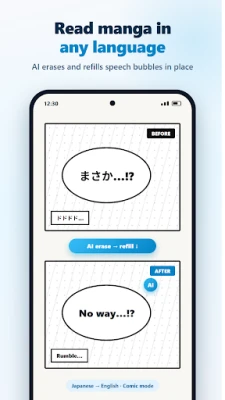
💬 Manga Mode - Smart bubble detection, multi-directional text, AI background restoration
🎮 Game Translator
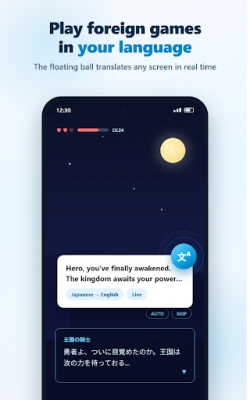
Supports JP, KR, US and other regional servers. Full-screen translates game UI, region mode targets dialogues and menus, auto-detection keeps gameplay uninterrupted. Custom glossaries keep character names and skills accurate.
📚 Manga and Comic Reading
Built for Manga, Manhwa and Webtoon. Handles vertical, horizontal and RTL text. AI restores backgrounds seamlessly.
📷 AR Real-Time Translation
Point your camera at signs, menus or labels to see translated text instantly. No photo needed.
🖼 Image Editor
Edit results directly on screenshots: drag text boxes, adjust fonts, modify content. Manga Mode includes a dedicated editor.
✂️ Text Selection
Select text in any app for instant translation without launching Screen Translate.
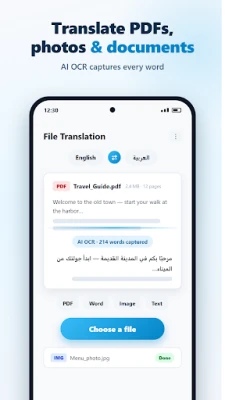
📄 Document Translation
Supports PDF, Word, TXT and image files. Cloud-based batch processing with notifications.
🗣️ Voice Conversation
Real-time bidirectional speech translation with system TTS or offline Vosk engine. Context-aware multi-turn dialogue for travel and meetings.
🤖 On-Device AI - Privacy-First Offline
▸ On-device OCR: Fast offline screen text recognition
▸ TranslateGemma: Local AI engine, fully offline
▸ Gemma Vision: On-device image understanding and OCR
Download once, use anytime. Your data never leaves your device.
⚙️ 20+ Engines
Google, Microsoft, DeepSeek AI, Baidu, Youdao, Tongyi Qwen, Zhipu and 13+ fallbacks ensure 99.9% uptime. Smart routing selects the best engine per language pair.
🔍 Advanced OCR
MLKit, Vision API, Baidu, Zhipu, Tongyi Qwen, Microsoft, Tesseract + on-device AI OCR. Multi-engine fusion for maximum accuracy.
🌍 100+ Languages
English, Japanese, Korean, French, German, Spanish, Portuguese, Russian, Arabic, Thai, Vietnamese, Indonesian, Chinese and more. 70+ offline packs available.
🛠 Smart Features
▸ Home screen widget for one-tap launch
▸ App shortcuts via long-press icon
▸ Customizable floating ball with gesture actions
▸ Edge-snapping auto-hide
▸ Dark mode, foldable and tablet optimized
▸ Translation memory and custom glossary
▸ AI style: formal, casual, concise or detailed
▸ History and favorites
🎁 Free VIP Access
Earn VIP daily via check-ins, reward videos or inviting friends.
📌 Use Cases
Overseas gaming, manga and comic reading, international shopping, cross-language chats, video subtitles, travel, language learning, business and academic research
Accessibility Notice
This app uses AccessibilityService to read on-screen text for translation only. Text is sent to your selected engine, never stored on our servers. In on-device AI mode, all processing occurs locally.
🎯 5 Translation Modes
📱 Standard Mode - 8 tools
▸ Full-screen capture: Translate everything on screen
▸ Region selection: Select and translate any area
▸ Subtitle detection: Auto-translate video subtitles
▸ Popup input: Type text for instant results
▸ Auto-screenshot: Detects screen changes for gaming and videos
▸ Speech-to-text: Real-time voice recognition
▸ Tap-to-translate: Tap anywhere to translate visible text
▸ Context-aware chat: Multi-turn conversational AI
📖 Reading Mode - Long articles and web pages with magnifier for precise word selection
🔲 Region Mode - Advanced region handling for complex layouts
🎬 Story Mode (VIP) - AI understands context and maintains narrative flow
💬 Manga Mode - Smart bubble detection, multi-directional text, AI background restoration
🎮 Game Translator
Supports JP, KR, US and other regional servers. Full-screen translates game UI, region mode targets dialogues and menus, auto-detection keeps gameplay uninterrupted. Custom glossaries keep character names and skills accurate.
📚 Manga and Comic Reading
Built for Manga, Manhwa and Webtoon. Handles vertical, horizontal and RTL text. AI restores backgrounds seamlessly.
📷 AR Real-Time Translation
Point your camera at signs, menus or labels to see translated text instantly. No photo needed.
🖼 Image Editor
Edit results directly on screenshots: drag text boxes, adjust fonts, modify content. Manga Mode includes a dedicated editor.
✂️ Text Selection
Select text in any app for instant translation without launching Screen Translate.
📄 Document Translation
Supports PDF, Word, TXT and image files. Cloud-based batch processing with notifications.
🗣️ Voice Conversation
Real-time bidirectional speech translation with system TTS or offline Vosk engine. Context-aware multi-turn dialogue for travel and meetings.
🤖 On-Device AI - Privacy-First Offline
▸ On-device OCR: Fast offline screen text recognition
▸ TranslateGemma: Local AI engine, fully offline
▸ Gemma Vision: On-device image understanding and OCR
Download once, use anytime. Your data never leaves your device.
⚙️ 20+ Engines
Google, Microsoft, DeepSeek AI, Baidu, Youdao, Tongyi Qwen, Zhipu and 13+ fallbacks ensure 99.9% uptime. Smart routing selects the best engine per language pair.
🔍 Advanced OCR
MLKit, Vision API, Baidu, Zhipu, Tongyi Qwen, Microsoft, Tesseract + on-device AI OCR. Multi-engine fusion for maximum accuracy.
🌍 100+ Languages
English, Japanese, Korean, French, German, Spanish, Portuguese, Russian, Arabic, Thai, Vietnamese, Indonesian, Chinese and more. 70+ offline packs available.
🛠 Smart Features
▸ Home screen widget for one-tap launch
▸ App shortcuts via long-press icon
▸ Customizable floating ball with gesture actions
▸ Edge-snapping auto-hide
▸ Dark mode, foldable and tablet optimized
▸ Translation memory and custom glossary
▸ AI style: formal, casual, concise or detailed
▸ History and favorites
🎁 Free VIP Access
Earn VIP daily via check-ins, reward videos or inviting friends.
📌 Use Cases
Overseas gaming, manga and comic reading, international shopping, cross-language chats, video subtitles, travel, language learning, business and academic research
Accessibility Notice
This app uses AccessibilityService to read on-screen text for translation only. Text is sent to your selected engine, never stored on our servers. In on-device AI mode, all processing occurs locally.
Rate the App
Add Comment & Review
User Reviews
Based on 0 reviews
No reviews added yet.
Comments will not be approved to be posted if they are SPAM, abusive, off-topic, use profanity, contain a personal attack, or promote hate of any kind.











More »

Popular Apps
CloudMoon - Cloud GamingCloudMoon Inc.

Dragon Mania LegendsGameloft SE

Shattered Pixel DungeonShattered Pixel

Airlearn - Learn LanguagesUNACADEMY INC

Cast Web Videos to TV - iWebTVRoku Chromecast Samsung FireTV

Chatspin - Random Video ChatTalk to strangers face to face

Supernova AI Spoken English24/7 Personal AI Tutor

FlipaClip: Create 2D AnimationVisual Blasters LLC

PUBG MOBILELevel Infinite

Mochi Live TVBruno-chanrio
More »
Editor's Choice

Evernote - Note OrganizerEvernote Corporation

Zoom Workplacezoom.com

Notion: Notes, Tasks, AINotion Labs, Inc.

TikTokTikTok Pte. Ltd.

Life360: Live Location SharingLife360

Family360 - GPS Live LocatorFamily360 - GPS Locator

ClassDojoClassDojo

ABCmouse – Kids Learning GamesAge of Learning, Inc.

YouTube KidsGoogle LLC

Google Family LinkGoogle LLC
 Android
 iOS
iOS