


Latest Version
Update
September 03, 2026
September 03, 2026
Developer
Vidura Prasangana Wijerathna
Vidura Prasangana Wijerathna
Categories
Tools
Tools
Platforms
Android
Android
Downloads
0
0
License
Free
Free
Package Name
me.vidura.speedtester
me.vidura.speedtester
Report
Report a Problem
Report a Problem
More About Speedtest: Internet Speed Test
Run a free internet speed test and see your real download speed, upload speed and ping in seconds — plus the charts that show exactly how the result was measured.
Speedtest is a small, native internet speed tester for Android. It measures download speed, upload speed, latency and jitter over your WiFi, 5G, 4G or broadband connection, then shows you the working behind the number instead of asking you to trust a single figure.
WHAT THIS SPEED TEST MEASURES
• Download speed test in Mbps, over several parallel connections
• Upload speed test in Mbps, measured the same way
• Ping test (idle latency) and jitter, taken before the transfer starts
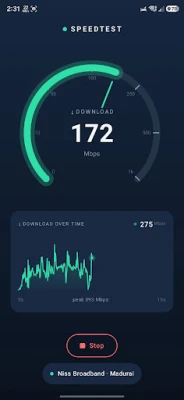
• A live speed meter that tracks real throughput as the test runs
• Download and upload charts, drawn point by point while data moves
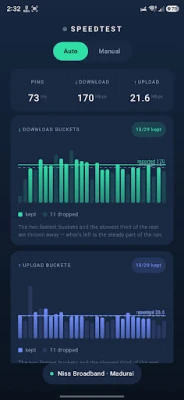
• A bucket-by-bucket breakdown of the finished internet speed test
TEST YOUR WIFI, MOBILE DATA OR BROADBAND
Use it as a WiFi speed test at home, a 5G or 4G speed test on mobile data, or a broadband speed test on fibre and cable. The same measurement runs on every connection, so the numbers are comparable — handy for checking whether your router, your phone, or your provider is the slow part.
CHOOSE YOUR OWN SPEED TEST SERVER
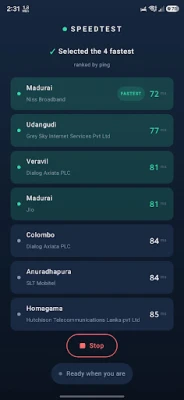
Auto mode pings nearby servers and tests against the fastest few.
Manual mode hands you the full server list, ranked by ping as results arrive, with a region search so you can run a speed test against a specific city or country. A connection can look fast locally and much slower once traffic leaves the region, and this is how you see it.
SEE HOW YOUR SPEED IS CALCULATED
Most speed test apps give you one figure and no way to check it. This internet speed tester splits the transfer into 500 ms slices and shows every one: which slices counted toward your result, which were discarded as outliers, and how the reported speed compares with the plain average of all bytes actually moved. When a download speed test result looks surprisingly high or low, you can see why.
NO ADS. NO TRACKING. NO ACCOUNT.
• No advertising, analytics, or crash-reporting libraries of any kind
• No sign-up, no profile, nothing to create
• Only two permissions: internet access and network state
• No location, contacts, storage, camera or microphone access
• Results are calculated on your device and are not uploaded anywhere
BUILT NATIVELY, NOT IN A WEB VIEW
The whole speed test runs in native code rather than a hidden web view, so it is not limited by browser connection caps and needs no proxy. That means more parallel connections, cleaner timing, and a truer reading on fast lines.
GOOD TO KNOW
A speed test measures the path between your device and one test server at one moment in time. WiFi conditions, distance to the server, and how busy that server is all affect the result. For the most reliable picture, run the internet speed test more than once, and in manual mode pick four or more servers.
Results are not saved between runs — there is no history or account, by design.
WHAT THIS SPEED TEST MEASURES
• Download speed test in Mbps, over several parallel connections
• Upload speed test in Mbps, measured the same way
• Ping test (idle latency) and jitter, taken before the transfer starts
• A live speed meter that tracks real throughput as the test runs
• Download and upload charts, drawn point by point while data moves
• A bucket-by-bucket breakdown of the finished internet speed test
TEST YOUR WIFI, MOBILE DATA OR BROADBAND
Use it as a WiFi speed test at home, a 5G or 4G speed test on mobile data, or a broadband speed test on fibre and cable. The same measurement runs on every connection, so the numbers are comparable — handy for checking whether your router, your phone, or your provider is the slow part.
CHOOSE YOUR OWN SPEED TEST SERVER
Auto mode pings nearby servers and tests against the fastest few.
Manual mode hands you the full server list, ranked by ping as results arrive, with a region search so you can run a speed test against a specific city or country. A connection can look fast locally and much slower once traffic leaves the region, and this is how you see it.
SEE HOW YOUR SPEED IS CALCULATED
Most speed test apps give you one figure and no way to check it. This internet speed tester splits the transfer into 500 ms slices and shows every one: which slices counted toward your result, which were discarded as outliers, and how the reported speed compares with the plain average of all bytes actually moved. When a download speed test result looks surprisingly high or low, you can see why.
NO ADS. NO TRACKING. NO ACCOUNT.
• No advertising, analytics, or crash-reporting libraries of any kind
• No sign-up, no profile, nothing to create
• Only two permissions: internet access and network state
• No location, contacts, storage, camera or microphone access
• Results are calculated on your device and are not uploaded anywhere
BUILT NATIVELY, NOT IN A WEB VIEW
The whole speed test runs in native code rather than a hidden web view, so it is not limited by browser connection caps and needs no proxy. That means more parallel connections, cleaner timing, and a truer reading on fast lines.
GOOD TO KNOW
A speed test measures the path between your device and one test server at one moment in time. WiFi conditions, distance to the server, and how busy that server is all affect the result. For the most reliable picture, run the internet speed test more than once, and in manual mode pick four or more servers.
Results are not saved between runs — there is no history or account, by design.
Rate the App
Add Comment & Review
User Reviews
Based on 0 reviews
No reviews added yet.
Comments will not be approved to be posted if they are SPAM, abusive, off-topic, use profanity, contain a personal attack, or promote hate of any kind.












More »

Popular Apps

Dragon Mania LegendsGameloft SE

CloudMoon - Cloud GamingCloudMoon Inc.

Shattered Pixel DungeonShattered Pixel

Airlearn - Learn LanguagesUNACADEMY INC

Cast Web Videos to TV - iWebTVRoku Chromecast Samsung FireTV

Chatspin - Random Video ChatTalk to strangers face to face

Supernova AI Spoken English24/7 Personal AI Tutor

FlipaClip: Create 2D AnimationVisual Blasters LLC

PUBG MOBILELevel Infinite

Mochi Live TVBruno-chanrio
More »
Editor's Choice

Evernote - Note OrganizerEvernote Corporation

Zoom Workplacezoom.com

Notion: Notes, Tasks, AINotion Labs, Inc.

TikTokTikTok Pte. Ltd.

Life360: Live Location SharingLife360

Family360 - GPS Live LocatorFamily360 - GPS Locator

ClassDojoClassDojo

ABCmouse – Kids Learning GamesAge of Learning, Inc.

YouTube KidsGoogle LLC

Google Family LinkGoogle LLC
 Android
 iOS
iOS